Skip to content
Medicine Passportby MediDocs

Your medicines. One place. In your language.

Keep track of what you take, why you take it, when to take it, and what to show your doctor — wherever you go.

  • Free for all patients
  • No app to install
  • App languages: English · हिंदी · తెలుగు · اردو

See how it works

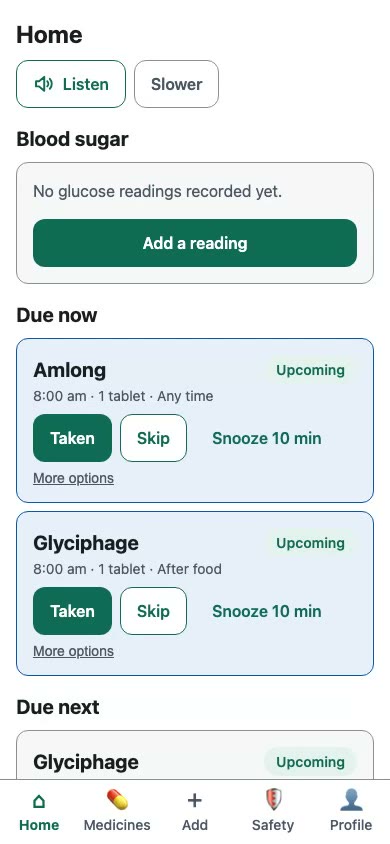
The Medicine Passport home screen shows medicines due now. A medicine is found by search and reviewed before saving. Today's timeline lists morning and night doses. A guidance passage is read aloud. A family caregiver's bounded permissions are shown.

Sound familiar?

?

“Which medicines are you taking?”

When every doctor has a different piece of your story, even a simple question becomes difficult. Strips in a drawer, prescriptions in a folder, photos on a phone — and a doctor waiting for an answer.

Two names, one ingredient

Doctor A prescribes one brand. Doctor B prescribes another. Two different brand names may contain the same ingredient — and there's no easy way for a family to tell.

Caring from another city

Your father's medicines are in Vijayawada. You're in Bengaluru. His memory of what changed at the last visit is the only record.

Your medicine information should travel with you — not stay scattered across prescriptions, doctors, pharmacies and hospital files.

That's what Medicine Passport is for.

Medicine
Glucomet 500
Ingredient
Metformin 500 mg
When
Morning and night, after food
Prescribed by
Dr. Rao
Your recorded reason
Blood sugar
Status
Current

Illustrative example — not a live screen.

One medicine record that belongs to the patient.

Every medicine, with the details that matter: name, ingredient, strength, when and how to take it, which doctor prescribed it, and why — in plain words. It's your record. It goes where you go.

Create my free Medicine Passport

Know what you're taking.

Add medicines your way: photograph a prescription and confirm what Medicine Passport reads — you check every detail before it's saved. Or find your medicine by search, or enter it yourself. Prescription photos and reports stay attached to your record.

  • Photo
  • Search
  • Type it in
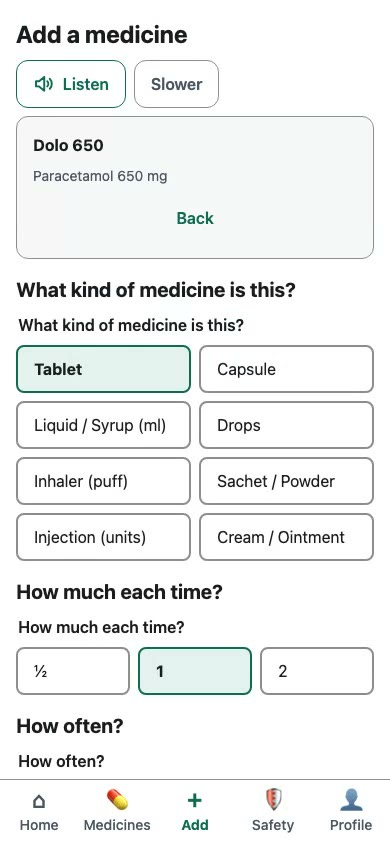
The patient searches for a medicine by name, selects it from the results, reviews the type, amount, frequency and food instruction with typing-free pickers, adds the reason, and saves. The medicine then appears in their Medicine Passport.

Know what comes next.

See today's medicines on one timeline. Mark doses taken, skipped or snoozed. Turn on browser reminders if you want them, and know when a medicine is running low. Medicine Passport helps keep today's medicines visible and organized.

  • Today's timeline
  • Optional reminders
  • Refill awareness
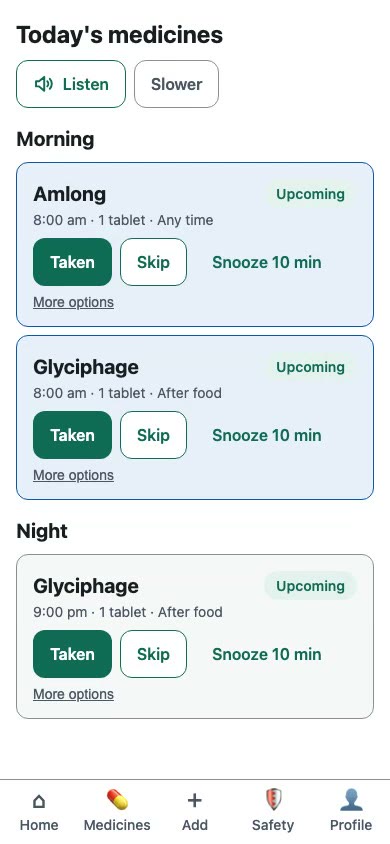
From the home screen, the patient opens today's full schedule. Today's medicines are grouped by morning and night. The patient marks a dose as taken and the timeline shows it as recorded.

Healthcare information shouldn't require perfect English, perfect eyesight or a new phone.

Read it — or listen to it.

The Medicine Passport app speaks English, हिंदी, తెలుగు and اردو — including right-to-left Urdu. Guidance throughout the app can be read aloud at the tap of a listen button. Big text, big buttons, simple screens — built for real phones on real networks.

English Listen
हिंदी Listen
తెలుగు Listen
اردو Listen
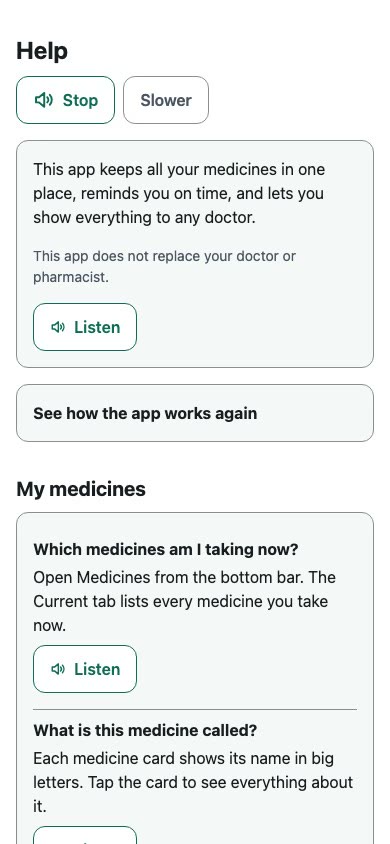
On the help screen, the patient taps Listen. The control changes to Stop while the guidance is read aloud, then the patient stops playback. (The demonstration video itself is silent.)

The app's real guidance voice (English). Plays only when you press the button.

Your medicine record shouldn't disappear when the network does.

Your saved medicines stay viewable without internet. Record doses offline — they sync when you're back. You always see whether you're offline, syncing, or up to date.

Reminders need a connection.

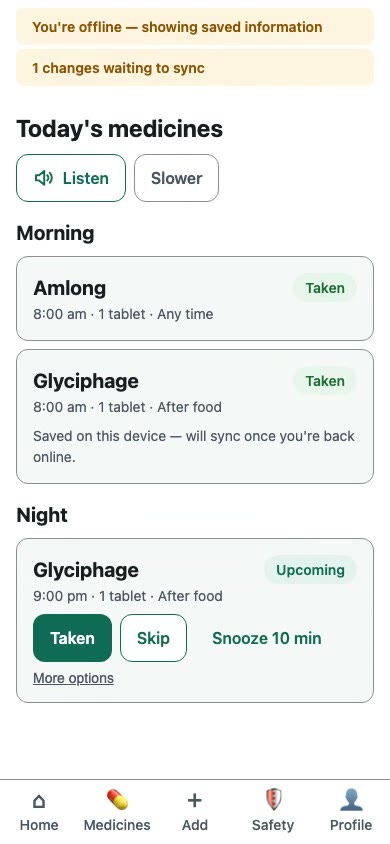
With the network disconnected, saved medicine information stays visible and an offline notice appears. The patient records a dose, which is saved on the device. When the connection returns, the change syncs automatically.

Help your parents without taking control away from them.

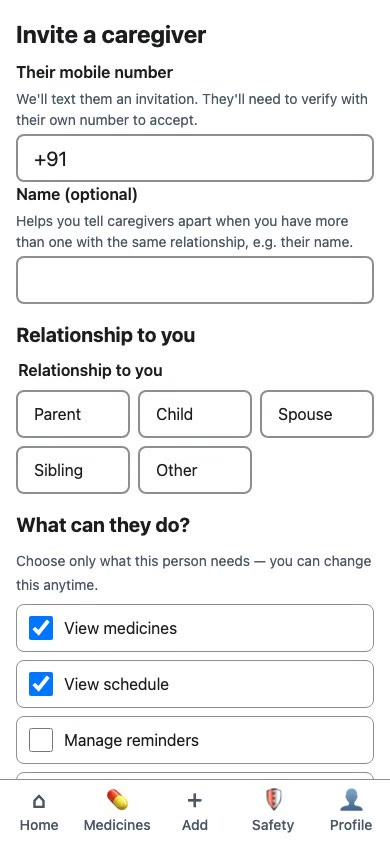
Invite family to help — and choose exactly what each person can see or do. Manage a parent's or dependent's medicines from anywhere. Every caregiver access is visible to the patient, and access can be removed at any time.

Help that is granted, bounded, visible — and removable.

Create a Medicine Passport for my family
From caregiver management, the patient opens a new invitation, enters the caregiver's number, and reviews exactly what the caregiver will be allowed to do — bounded permissions chosen by the patient.

Bring your medicine list to the appointment — not a folder of paper.

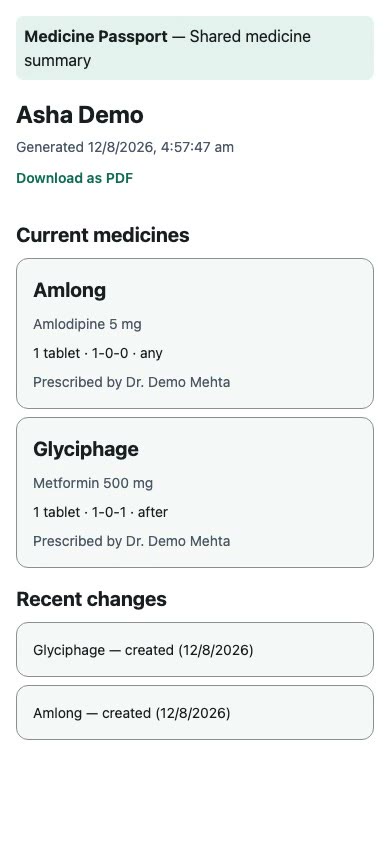
Create a share with a QR code or a link that lasts as long as you choose. The doctor opens a structured summary on their own device — no MediDocs account, nothing to install. You can stop the link at any time, and see when it was opened.

  • QR or link
  • You set how long it lasts
  • No doctor account
  • Stop the link any time
The patient chooses what to include and how long the link lasts, then creates a share. The doctor opens a structured Medicine Passport summary on their own device — current medicines with ingredients and instructions, recent changes, and a PDF option. The QR/link screen and the share token are deliberately not shown in this clip.

Medicine Passport is free for all patients.

Your medicine information belongs to you. Medicine Passport is free for all patients to create, maintain and access. We plan to sustain MediDocs through services and partnerships with healthcare organizations — not by charging patients for access to their own medicine information.

  • No advertising in the patient experience
  • No paywall on your own record
Create my free Medicine Passport

Built to help you understand your medicines — not to replace your doctor.

Medicine Passport does

  • Keep your medicine information organized — and yours.
  • Show today's doses on one timeline, with optional browser reminders.
  • Work offline for viewing and recording, syncing when you're back.
  • Let family help through permissions you grant, see, and can remove.

Medicine Passport does not

  • It does not diagnose or prescribe.
  • It does not tell you to start or stop a medicine.
  • It does not substitute one medicine for another.
  • It does not declare any medicine “safe”.
  • It does not replace doctors or pharmacists.

Are you a doctor, pharmacist or clinic?

See how a patient-held Medicine Passport can make medication information easier to review when the patient chooses to share it.

Medicine Passport for healthcare professionals

Questions families actually ask.

Is Medicine Passport really free?

Yes — free for all patients to create, maintain and access. We plan to sustain MediDocs through services and partnerships with healthcare organizations, not by charging patients.

Do I need to install an app?

No. Medicine Passport works in your phone's browser. You can add it to your home screen if you like, but you never have to.

Which languages does the app support?

The app supports English, Hindi, Telugu and Urdu. This website is currently in English, with more languages coming after translation review.

Can my family help manage my medicines?

Yes. Invite a family member and choose exactly what they can see or do. You can see every access they make, and remove their access at any time.

Can it tell me whether two medicines are safe together?

No. Medicine Passport does not check drug interactions and never declares any combination safe. Questions about taking medicines together belong with your doctor or pharmacist.

Does Medicine Passport replace medical advice?

No. It helps you keep and understand your own medicine information. Decisions about your medicines always belong with your doctor or pharmacist.

What happens if I have no internet?

Your saved medicines stay viewable, and you can record doses offline — everything syncs when you're back. Reminders need a connection.

Who can see my information?

Your Medicine Passport isn't publicly listed. Family caregivers only receive the access you grant them, and you can remove that access at any time.

Can I remove a family member's access?

Yes, at any time. Caregiver access is granted by you, visible to you, and removable by you.

Take your medicine information with you.

Start your Medicine Passport today.
Create my free Medicine Passport